Benefits of Expense Tracking

Expense tracking might seem like a chore, but it's a powerful tool for taking control of your finances. Here's how it can benefit you:

  • 1
    Awareness: Ever feel like your money disappears each month? Tracking expenses exposes exactly where your hard-earned cash goes. You might be surprised how much accumulates in small purchases like daily coffee runs.
  • 2
    Budgeting Powerhouse: With a clear picture of your spending habits, you can create a realistic budget.  Allocating funds to different categories (rent, groceries, entertainment) ensures you don't overspend in one area and leave yourself short in another.
  • 3
    Curb Unnecessary Spending: Tracking can be a real eye-opener. You might identify areas where you're unconsciously spending more than you intended.  Those daily lattes or impulse online buys can add up quickly.  Identifying these areas allows you to decide where to cut back.
  • 4
    Goal Achievement Turbocharger: Do you dream of a vacation or a down payment on a house? Tracking expenses helps you see how much you can realistically save toward your goals.  It also helps you identify areas to free up additional cash to put towards those dreams.

How to do it

Expense tracking can be as simple or sophisticated as you like. Here are two methods to get you started:

Manual Tracking:

  • 1
    Gather your tools: Grab a notebook, spreadsheet, or printable expense tracker
  • 2
    Track daily: Throughout the day, note down every expense, including the amount, category
    (groceries, gas, entertainment),
    and payment method
    (cash, debit card, credit card).
  • 3
    Categorize: Regularly (weekly or monthly) categorize your expenses. This will help you identify spending patterns. Common categories include
    rent/mortgage, groceries, utilities, transportation, entertainment, debt payments, and savings.
  • 4
    Analyze: Review your categorized expenses. Are there any areas where you’re consistently overspending? Look for trends and areas for potential cutbacks.

Digital Tracking:

  • 1
    Choose your app: There are many free and paid expense-tracking apps available. Consider using TimelyBills, a popular option that integrates with your bank accounts for automatic transaction downloads.
  • 2
    Connect accounts: Securely link your bank accounts and credit cards to TimelyBills. This allows for automatic expense categorization and simplifies data entry.
  • 3
    On-the-go tracking: TimelyBills allows you to add expenses anytime, anywhere quickly and easily.
  • 4
    Reporting & Insights: TimelyBills offers reports and data visualization tools to help you identify spending trends and areas for improvement.

Tips for Success:

  • 1
    Choose a method that works for you: Experiment with different methods to find what you’ll stick with.
  • 2
    Be consistent:  Regular tracking is key to gaining valuable insights.
  • 3
    Review regularly:  Schedule regular reviews of your tracked expenses.
  • 4
    Adjust your budget:  Use your expense tracking data to refine your budget and spending goals.
How to do it with the TimelyBills
TimelyBill is a smart expense tracker that simplifies your financial life. Easily monitor your spending through manual or automatic tracking.

Automatic Expenses Tracking

Say goodbye to manual expense entry. TimelyBills offers seamless automated tracking for US and Canadian bank accounts

  • a
    Easily connect your US or Canadian bank accounts to TimelyBills for automatic transaction tracking. (Learn how to link your accounts here)
  • b
    Once connected, TimelyBills will automatically import your transaction history.
  • c
    For cash expenses, simply add them manually (Learn how to log manual expenses here).

Manual Expenses Tracking

Manual expense tracking involves recording financial expenditures by manually inputting details into the TimelyBills app.

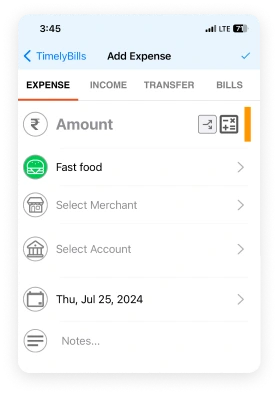
To manually add an expense:
  • 1
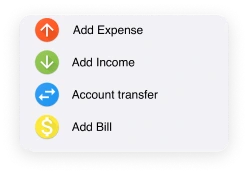
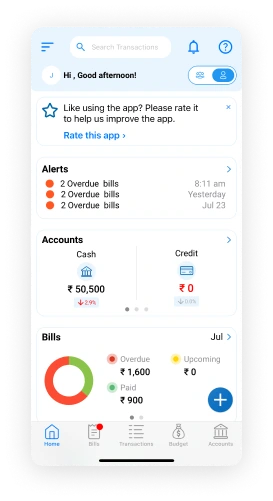
    Tap the "" button at the bottom left of the screen.
  • 2
    Select "Add Expense"
  • 3
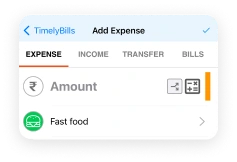
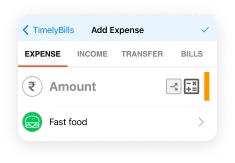
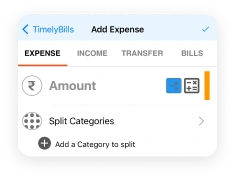
    Enter the total expense amount and Choose the expense category.
  • 4
    To split the amount across multiple categories, tap the "Split" button next to the amount field. You can then allocate portions of the amount to different categories.
  • 5
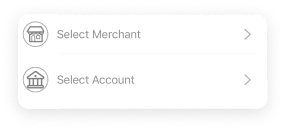
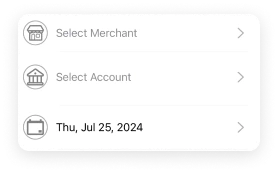
    Optionally, select the merchant and the account used for the transaction.
  • 6
    Choose the transaction date
  • 7
    Tap "Done" to save the expense.

How frequently should you add expenses

Daily or near-daily tracking is generally recommended for effective expense control.

Here's why:
  1. Accurate picture: A daily record provides a clear, real-time view of your spending habits.
  2. Early detection: You can identify potential overspending issues promptly.
  3. Better budgeting: Daily tracking helps you adjust your budget as needed.
  4. Improved financial awareness: Regular tracking fosters a mindful spending approach

However, the ideal frequency might vary based on your spending patterns and goals.

  1. High spenders: Daily tracking is crucial to maintain control.
  2. Low spenders: Weekly tracking might suffice, but daily tracking offers more detailed insights.
  3. Specific goals:  If you're saving for a particular item, more frequent tracking can help you stay on track.